• Home
  • Codici Sconto
  • Life
myHobby.fun
  • Tecnologia
  • Viaggiare
Home » Tecnologia » How to Replace Vodafone Ultra Hub 7 with Your Own Router
Tecnologia

How to Replace Vodafone Ultra Hub 7 with Your Own Router

by Luigi 5th Ottobre 2026
5th Ottobre 2026
2
5
(1)

If you have a Vodafone Broadband connection in the UK or Ireland, you were likely given the standard Vodafone Ultra Hub 7. While it handles basic home Wi-Fi fine, power users and tech enthusiasts often want more control, better security, or integrated network setups using custom hardware like pfSense, Ubiquiti UniFi, TP-Link, or Asus routers.

The good news? You can completely bypass the Ultra Hub 7 and connect your own router or firewall directly to the fiber ONT (Optical Network Terminal).

In this guide, we will walk you through how to configure your custom hardware for Vodafone Fiber and Vodafone FTTC, including how to extract your PPPoE credentials, handle VLAN tagging, and optimize your MTU settings for maximum speed.

Indice

  • Why Replace the Vodafone Ultra Hub 7?
  • What You Will Need
    • Step 1: Obtain Your Vodafone PPPoE Credentials
    • Step 2: Handle VLAN 10 Tagging
      • Option A: Tagging directly on your Router/Firewall (Most Common)
      • Option B: Offloading VLAN Tagging to a Managed Switch
    • Step 3: Configure the PPPoE Connection
    • Step 4: MTU Optimization & Speed Verification
  • Real-World Speed Test Results
  • Summary Checklist

Why Replace the Vodafone Ultra Hub 7?

Replacing the default ISP hardware gives you several advantages:

  • Full control over your network: Custom firewall rules, VPN clients/servers, and detailed bandwidth monitoring.
  • Better performance: Eliminate local bottlenecks when handling hundreds of concurrent network connections.
  • No forced MAC cloning: Vodafone does not lock your connection to the Ultra Hub 7’s MAC address, making hardware upgrades seamless.

What You Will Need

Before starting, gather the following details:

  1. Your Vodafone Ultra Hub 7 Router: Look at the sticker on the back or bottom to find its Serial Number.
  2. Your Custom Router or Firewall: Any router supporting PPPoE and VLAN tagging on the WAN interface (e.g., pfSense, OPNsense, UniFi Dream Machine, TP-Link Omada, Asus, etc.).
  3. An Ethernet Cable: Connecting your ONT directly to your WAN port (or managed switch).

Step 1: Obtain Your Vodafone PPPoE Credentials

Unlike some ISPs that require you to call support for login details, Vodafone uses a standard credential format based on your router’s hardware serial number:

  • Username format: SDY<SERIAL_NUMBER>@vfiefttc.ie
    (Replace <SERIAL_NUMBER> with the exact serial number printed on your Ultra Hub 7 sticker, keeping the SDY prefix).
  • Password: broadband

Note: MAC address cloning is not required. The connection authenticates purely based on these PPPoE credentials.

Step 2: Handle VLAN 10 Tagging

Vodafone Fiber and FTTC connections require traffic on the WAN port to be tagged with VLAN 10. You can set this up in one of two ways depending on your hardware topology:

Option A: Tagging directly on your Router/Firewall (Most Common)

Go to your router’s WAN interface settings, set the Internet Connection Type to PPPoE, and enable VLAN Tagging (ID: 10) directly on the WAN port.

Option B: Offloading VLAN Tagging to a Managed Switch

If your firewall runs inside a Virtual Machine or your router handles VLANs upstream, you can offload VLAN 10 tagging to a managed switch (such as a Ubiquiti Switch Lite 8 PoE).
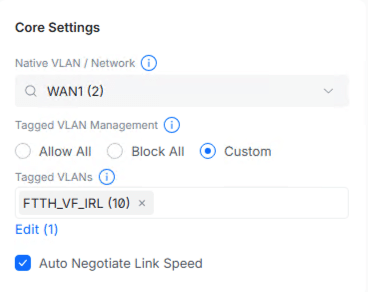
Ubiquiti UniFi switch port core settings tagged with FTTH VLAN 10 for Vodafone Ultra Hub
  • Connect the cable from the SIRO / Fiber ONT directly into a switch port (e.g., Port 8).
  • Tag that specific switch port on VLAN 10.
  • Deliver the traffic untagged to your router’s virtual or physical WAN interface.

Step 3: Configure the PPPoE Connection

  1. Open your router or firewall configuration interface (e.g., pfSense, UniFi Controller, or router web dashboard).
  2. Navigate to your WAN Interface configuration.
  3. Select PPPoE as the Link / Connection Type.
  4. Enter your credentials:
    • Username: [email protected]
    • Password: broadband
  5. Leave the Service Name blank (or set to default).
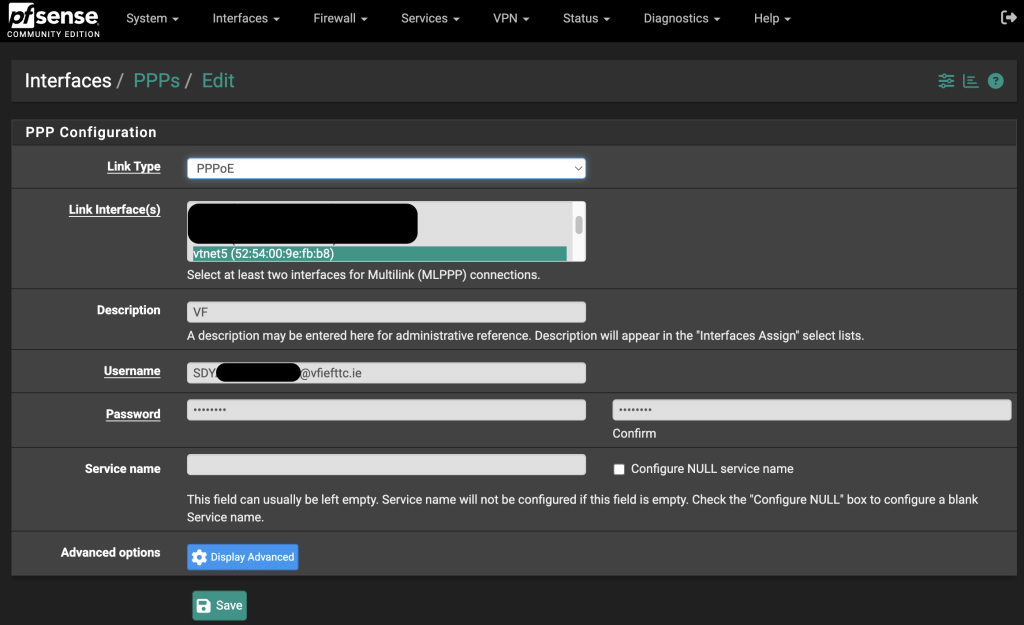
pfSense PPP configuration interface showing PPPoE link type with Vodafone Ireland username and password settings

Step 4: MTU Optimization & Speed Verification

To prevent packet fragmentation over PPPoE connections, adjust your WAN interface MTU (Maximum Transmission Unit) setting to 1492.
Once saved and applied, your custom router will establish a direct session with Vodafone’s network within a few seconds.

Real-World Speed Test Results

Bypassing the Ultra Hub 7 yields excellent performance with minimal overhead:

  • Download Speed: ~880 Mbps on a 1 Gbps Gigabit profile.
  • Upload Speed: ~102 Mbps on a 100 Mbps profile (fully maxing out the allocated upload tier).

Summary Checklist

SettingValue
Connection TypePPPoE
VLAN ID10
UsernameSDY<SERIAL_NUMBER>@vfiefttc.ie
Passwordbroadband
MTU1492
MAC Address CloningNot Required

By following these simple steps, you can enjoy a faster, fully customizable home network without relying on the Vodafone Ultra Hub 7!

Quanto ti è piaciuto questo articolo?

Clicca per votare

Voto medio 5 / 5. Voti: 1

Nessun voto per ora.

Ora che hai votato....

Condividici con i tuoi amici!

Ci dispiace non ti sia piaciuto questo articolo!

Aiutaci a migliorare.

Cosa potremmo migliorare in questo articolo?

Hai trovato utile questo articolo?
Si0No0
pfsensepppoevodafone fibervodafone irelandvodafone routervodafone sirovodafone uk
Luigi

Luigi è un professionista IT ed esperto di risparmio digitale che da anni testa in prima persona codici sconto, bonus di benvenuto e promozioni online prima di recensirli. Ogni offerta presente sul blog — dai servizi di telefonia come Very Mobile e Iliad, alle app di finanza personale come Satispay, Tinaba e ING — viene provata direttamente per verificare il risparmio reale e segnalare eventuali costi nascosti. Tra un'analisi e l'altra, condivide guide pratiche per viaggiare low cost nel mondo. Il suo obiettivo è uno solo: aiutare i lettori a ottimizzare le spese senza perdere tempo con offerte ingannevoli.

Articolo Precedente
Tempesta in arrivo: come l’Anticiclone Africano cede il passo al maltempo

Articoli simili

Prime Big Deal Days 6 e 7 ottobre:...

16th Settembre 2026

Google Workspace codici sconto: risparmia il 10% sul...

2nd Giugno 2026

myPos Terminale Pos e Account pagamenti gratuito da...

4th Maggio 2025

Articoli trending

  • 1

    Protetto: Codice Promo Tinaba 2026

  • 2

    Amazon Haul: La Rivoluzione dello Shopping Low-Cost Arriva...

  • 3

    Woolsocks – the money app

  • 4

    Prime Big Deal Days 6 e 7 ottobre:...

  • 5

    Lounge Venice Airport gratuita 2022

Ultimi Codici Sconto

  • Conto ING Direct: come ottenere €50 di Bonus

    15th Maggio 2026
  • Codice Amico Very Mobile UERDZJQU: come funziona e quanto guadagni

    8th Aprile 2026
  • Satispay Promo 50 Euro – Agosto 2026

    31st Marzo 2026
  • Affiliate Disclosure
  • Cookie Policy (UE)
  • Privacy Policy

© 2026 - Tutti i diritti riservati - MyHobby.fun

Gestisci Consenso Cookie
Usiamo tecnologie come i cookie per memorizzare e/o accedere ad informazioni sul dispositivo. Lo facciamo per migliorare l'esperienza di navigazione e mostrare annunci personalizzati. Fornire il consenso a queste tecnologie ci consente di elaborare dati quali il comportamento durante la navigazione o ID univoche su questo sito. Non fornire o ritirare il consenso potrebbe influire negativamente su alcune funzionalità e funzioni.
Funzionale Sempre attivo
L'archiviazione tecnica o l'accesso sono strettamente necessari al fine legittimo di consentire l'uso di un servizio specifico esplicitamente richiesto dall'abbonato o dall'utente, o al solo scopo di effettuare la trasmissione di una comunicazione su una rete di comunicazione elettronica.
Preferenze
L'archiviazione tecnica o l'accesso sono necessari per lo scopo legittimo di memorizzare le preferenze che non sono richieste dall'abbonato o dall'utente.
Statistiche
L'archiviazione tecnica o l'accesso che viene utilizzato esclusivamente per scopi statistici. L'archiviazione tecnica o l'accesso che viene utilizzato esclusivamente per scopi statistici anonimi. Senza un mandato di comparizione, una conformità volontaria da parte del vostro Fornitore di Servizi Internet, o ulteriori registrazioni da parte di terzi, le informazioni memorizzate o recuperate per questo scopo da sole non possono di solito essere utilizzate per l'identificazione.
Marketing
L'archiviazione tecnica o l'accesso sono necessari per creare profili di utenti per inviare pubblicità, o per tracciare l'utente su un sito web o su diversi siti web per scopi di marketing simili.
  • Gestisci opzioni
  • Gestisci servizi
  • Gestisci {vendor_count} fornitori
  • Per saperne di più su questi scopi
Visualizza le preferenze
  • {title}
  • {title}
  • {title}
myHobby.fun
  • Home
  • Codici Sconto
  • Life
myHobby.fun
  • Tecnologia
  • Viaggiare